Solutions / Bookings & quotes
SOLUTION 01
Your whole Rent a Car business. On one screen.
From availability and bookings to rentals, tax documents and payments. All organised on one platform.
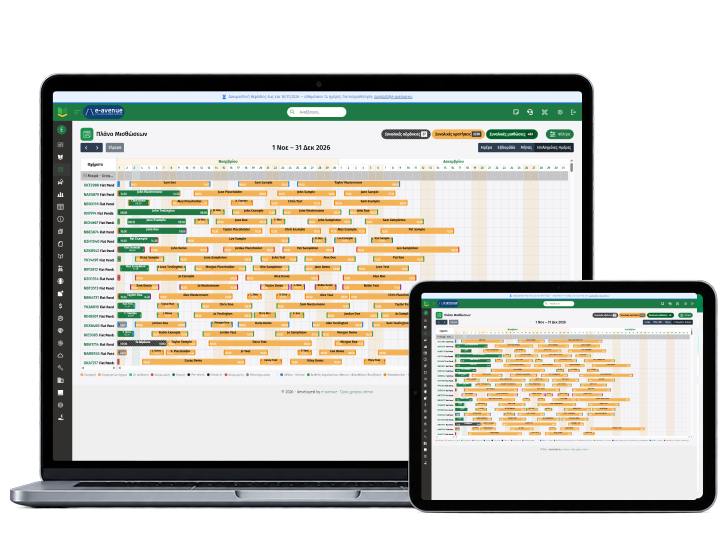
- Rental/Booking Planner
- Quote → Booking → Rental
- Prices with or without VAT

THE PROBLEM
From availability chaos to one planner
TODAY
Availability spread across files, phone calls and messages
Quotes that get lost, without knowing which are still pending
Double bookings and pricing mistakes
Excelphonemessagepaper;;WITH RENTALBOOK
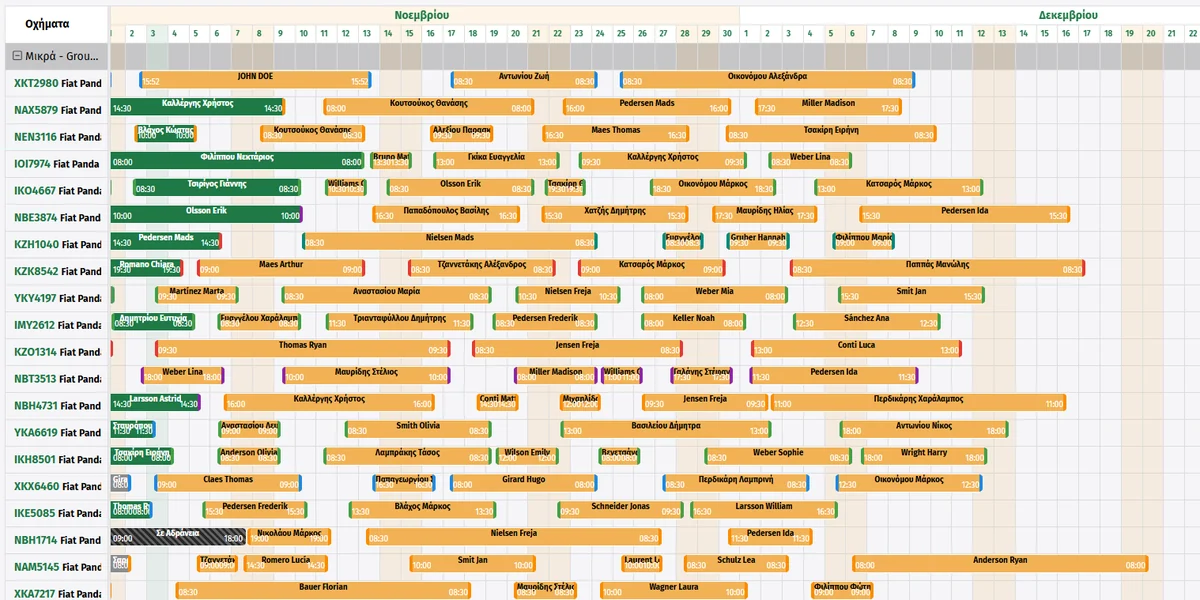
- One rental/booking planner with your whole fleet
- From quote to rental, one click at each step
- One source of truth for availability and prices
HOW IT WORKS
From the planner to the booking
Rental planner → booking form
- 1Check the rental/booking planner and find an available vehicle
- 2Open the form and fill in the details
- 3The booking appears in the planner straight away
FEATURES
Everything you need to close deals fast

Rental/booking planner
Your whole fleet in one view, with bookings and rentals per vehicle.
Availability search
Choose dates, station and category and see what’s free.
- Dates
- Stations
- Categories
Quote and booking
Create a quote and turn it into a booking without retyping the details.
- Quote
- Booking
- Customer details
Prices with or without VAT
Prices are calculated automatically, showing the price you want the customer to see.
- With VAT
- Without VAT
- Automatic calculation
BENEFITS
What you gain
Answer in seconds
See availability and price instantly, without searching.
Know what’s pending
See which quotes and bookings need action.
Close without mistakes
One source of truth for availability and prices.
FREQUENTLY ASKED QUESTIONS
Frequently asked questions
The most common questions about bookings and quotes.
Can I check availability across more than one station?
Yes. Choose dates, station and vehicle category and see availability instantly, so you can organise your bookings easily.
Can I turn a quote into a booking and then into a rental?
Yes. With one click at each step, you turn the quote into a booking and the booking into a rental, without entering the same details again.
Can I show prices with or without VAT?
Yes. RentalBook calculates prices with or without VAT automatically, so you can show the customer the price you want, with no manual calculations.
How are double bookings avoided?
Every new booking updates the rental planner instantly, so you always have a clear view of availability and avoid double bookings.
Didn’t find the answer?
Talk to our support team or see Rentalbook in action, with a demo for your own company.
OTHER SOLUTIONS
Explore these solutions too
SOLUTION 01
Bookings & quotes
Availability search and a 40-day rental planner.
→ See the solution
SOLUTION 02
Pick-ups, returns & contracts
The day’s returns and pick-ups, digital signature on a tablet.
→ See the solution
SOLUTION 03
Fleet & vehicles
Vehicle record with MOT, servicing and a QR code per vehicle.

→ See the solution
SOLUTION 04
Invoicing & AADE
Tax documents with automatic transmission to myDATA.
→ See the solution
SOLUTION 05
Accounting & payments
Balances, incoming tax documents and the daily cash report.
→ See the solution
SOLUTION 06
Website & online bookings
A 4-step booking engine, connected to the rental planner.
→ See the solutionSee RentalBook in your own business
See how it works: from the quote and digital signature to tax documents and reports. The demo is tailored to the way your company works.